Public beta available
Link'd DMR 0.2.65 Public Beta
Signed Android 8.0+ APK with cellular-first PTT and the compact exact-CJ radio home.
Released August 27, 2026Android 8.0+ cellular; verified Android 14 / API 34 CJ-1 firmware family for RF72.3 MiBBuild 68
64 qualified downloads countedLive verified count. repeat starts from the same browser that day count once.
CJ-1 verification is required only for RF features
Regular Android 8.0+ phones can install the app and use the cellular beta without this hardware check. Before enabling CJ-1 RF or Enhanced Privacy, use the website compatibility tool and continue only when it confirms the exact CJ_1UV, a supported DMR003N.UV4P.V### live layout, and selector 01. The app cannot independently distinguish selector 05 from selector 01.
What is included
- Replaces the withdrawn Code67 build with a forward-installable recovery that restores the proven schema-12 database and original all-features app baseline.
- Fixes the Code67 startup crash affecting existing customers, including customers who never configured Enhanced Privacy; the crash was caused by an incorrect database-version rollback, not by a customer privacy key.
- Keeps the same Android package and production signing certificate with version code 68, so customers can install Code68 directly over Code66 or Code67 without uninstalling, clearing storage, or losing app data.
- Preserves Enhanced Privacy, accounts, Link'd Business, CPS, channels, contacts, settings, and the seven reviewed CJ-1 feature tracks from Code66.
- Does not create a default Enhanced Privacy key or show one as saved. A saved key exists only after the customer explicitly enters and saves it.
- Withdraws Scanner V2 and the home-screen widget from this emergency recovery because their Code67 build used the wrong older base. They will be republished only after a correct rebase and live CJ-1 validation.
- Preserves the signed public-beta build 66 feature set with all seven reviewed CJ-1 tracks while retaining the established package and signing identity for in-place updates.
- Adds role-gated Dispatcher Lite incident assignment, release, and accountability controls backed by the existing server-authorized organization boundary.
- Adds deliberate manual RF and Cellular path selection with a keyed-call interlock. The Automatic engine remains safely unavailable when its production adapter is not configured.
- Adds bounded direct Nearby coordination queues for canned status, check-ins, and assignments with expiry, deduplication, authorization re-checks, and receipts. Nearby remains safely unavailable without its production transport adapter, and this build does not claim multi-hop delivery.
- Adds validated physical-control routing for supported CJ-1 profiles, including debounced actions and clear user feedback, while leaving unknown mappings unavailable.
- Adds Bluetooth PTT and audio-route state with visible confirmation and fail-closed transmit release when an approved accessory disconnects.
- Adds audience-bound, expiring, replay-safe signed configuration handoff with local review, durable receipts, verification, backup, and rollback boundaries; there is no silent remote radio or firmware programming.
- Adds privacy-safe field diagnostics for coarse thermal state, reconnect and transport history, and module state while excluding audio, transcripts, precise location, credentials, tokens, and private keys.
- Publishes signed public-beta build 65 with the sealed V1/V2 Professional Operations compatibility validation. The package identity and signing certificate remain unchanged, so existing public-beta testers can update in place.
- Fixes a stale connection-generation race that could leave Cellular PTT offline after the server had already issued a valid grant. A connection now proceeds only while the exact current authorization and media generation remain accepted, and presence is published after the room joins.
- Makes the supported CJ-1 Diagnostics Restart a fail-closed, generation-fenced transaction that restores the exact durable zone and channel only on the accepted successor radio service.
- Preserves the selected channel, privacy state, and unkeyed PTT boundary across service restart; a superseded, failed, or incomplete restart remains locked instead of reporting a false success.
- Completes physical acceptance on Samsung Galaxy S25 and exact CJ-1 hardware, including clean Cellular connect and disconnect, CJ-1 restart continuity, and bounded CJ-1-to-Android receive audio.
- Adds the explicit Link'd Business schema 2 contract so Android accepts the multi-industry organization profile and server-provided Site, Team, and Channel labels without hiding authorized Cellular Team Channels.
- Keeps the strict authorization and one-private-Cellular-Channel-per-Team model unchanged while making workspace refresh and invitation acceptance compatible with the deployed Business schema 2 response.
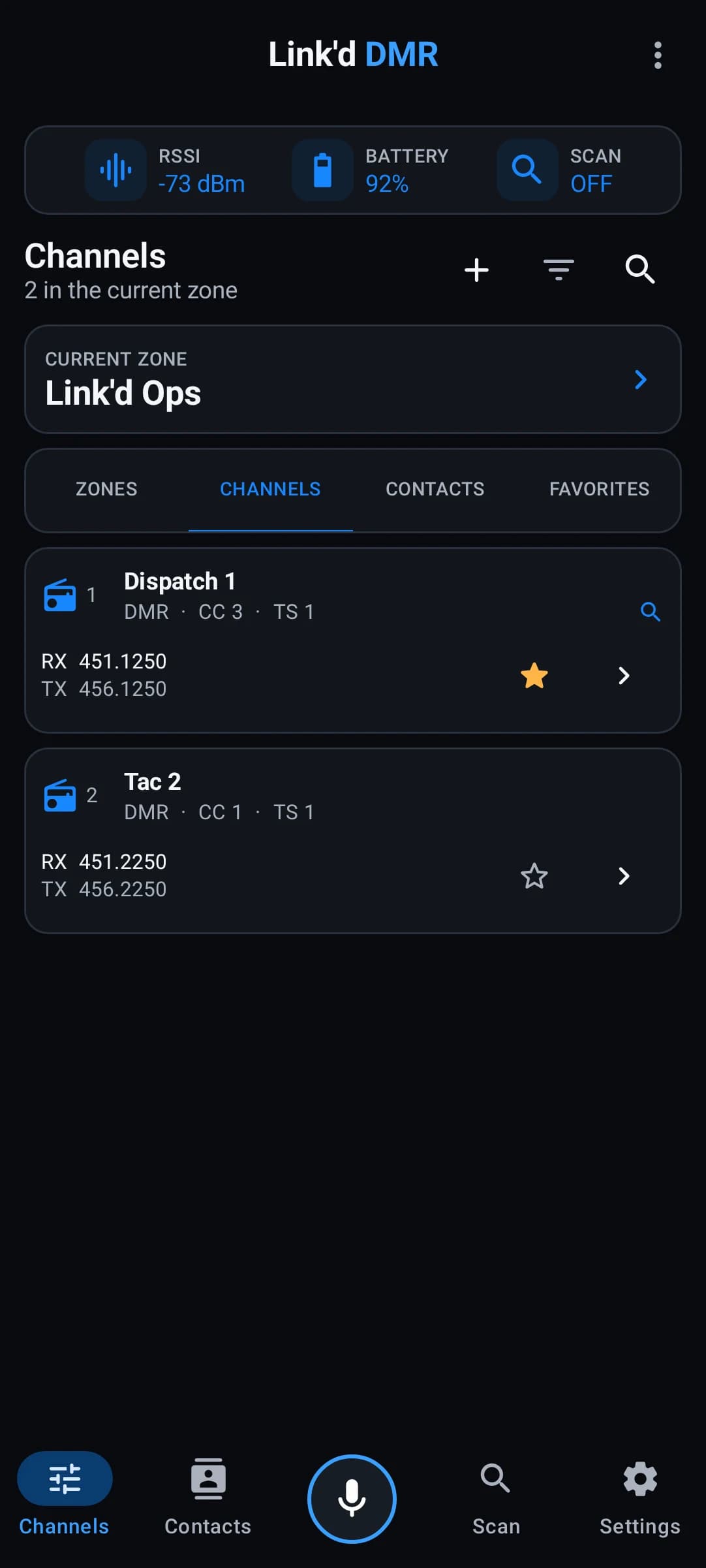
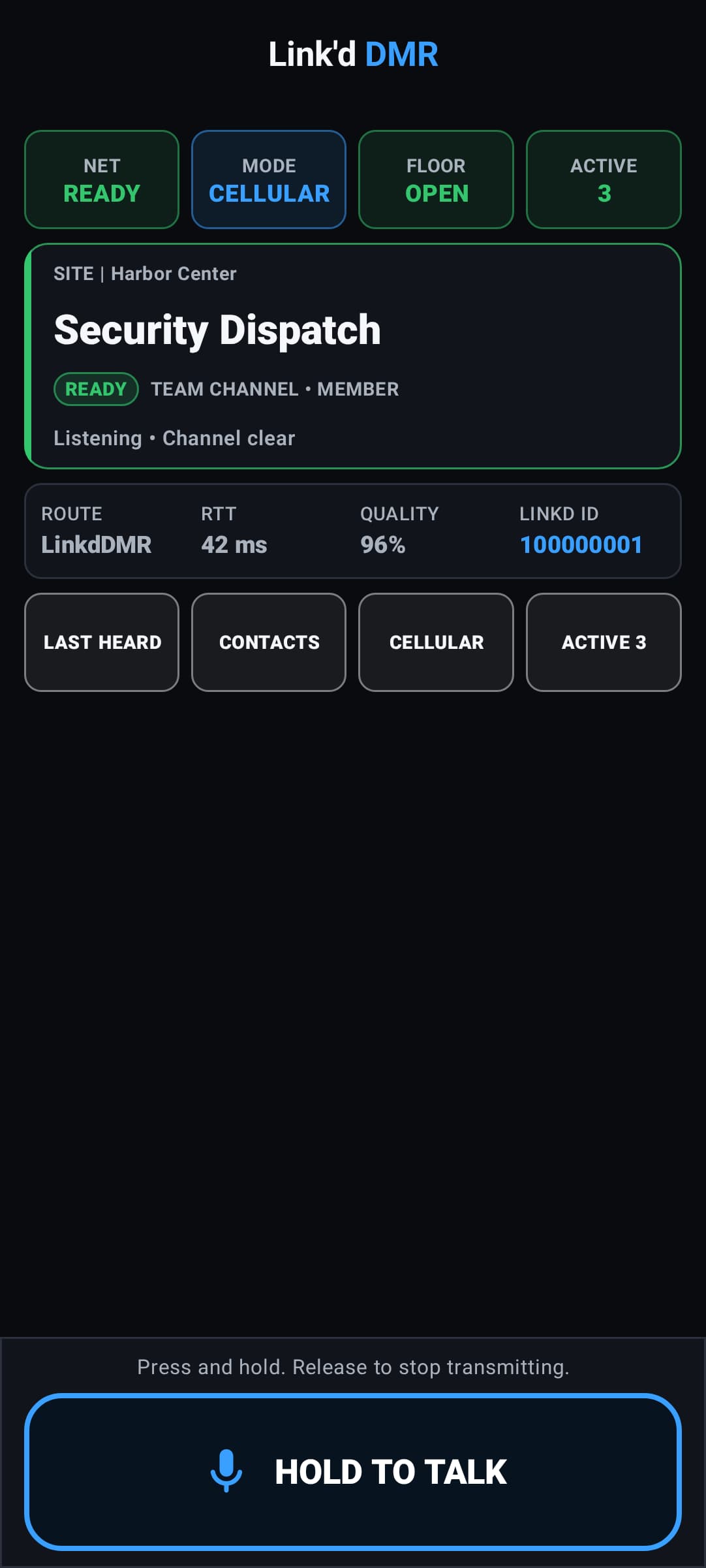
- Brings the professional radio operating pattern to Cellular on regular Android phones and CJ-1: a clear Channel and activity view, readable READY, RECEIVING, and TRANSMITTING states, and bottom-anchored hold-to-talk.
- Expands Link'd Business into a Security-first, multi-industry Site, Team, and Channel workspace and adds the protected Link'd Command dashboard for coarse online presence, current speakers, Team rosters, pending invitations, and recent administrative activity.
- Business Team selection delegates the existing account-authorized Cellular PTT path, with exactly one private Cellular Channel per Team; it does not add a second PTT engine or change the CJ-1 RF channel selector.
- Business workspace state remains outside the RF codeplug, CPS, Enhanced Privacy keys, owner recording files, credentials, and firmware surfaces.
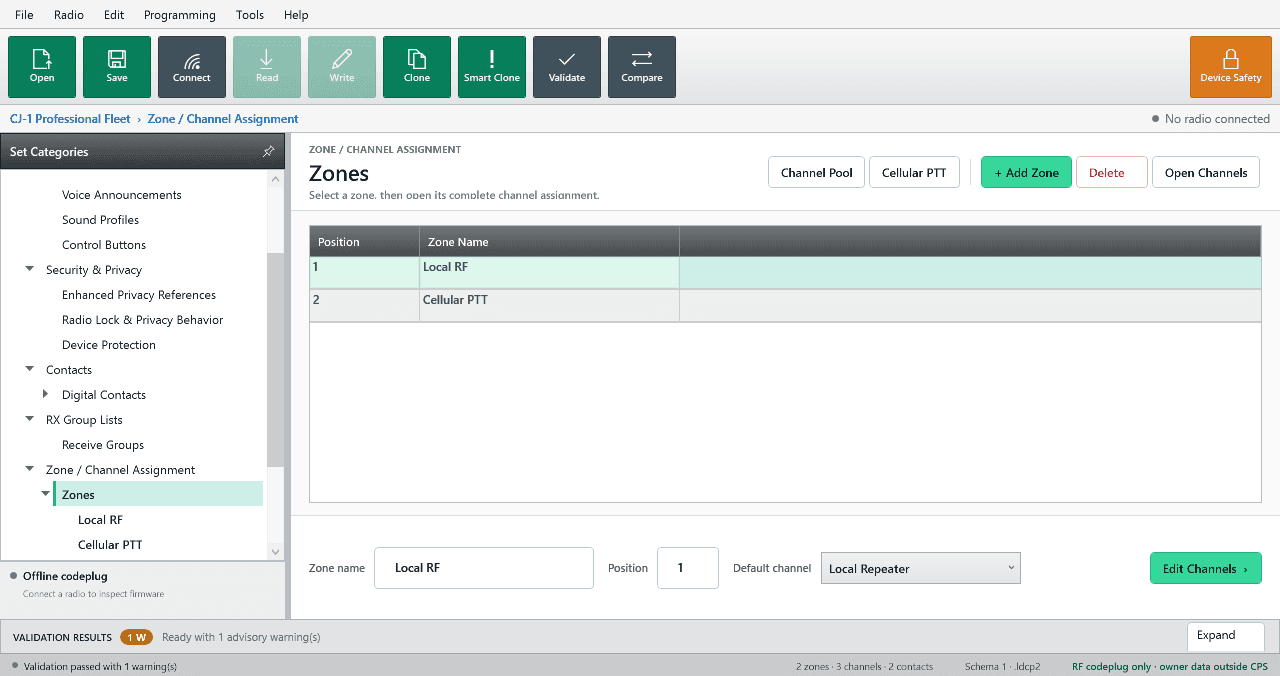
- Adds the protected Link'd DMR CPS 2.0 companion bridge for reading and writing the non-secret RF codeplug over authenticated USB ADB.
- CPS programming can request a safe radio-service stop before commit, then performs token-bound backup, transfer, verification, finalize, and recovery handling.
- Recordings, archives, credentials, history, privacy key bytes, firmware, and flashing controls remain outside the CPS bridge and are not exposed to Windows.
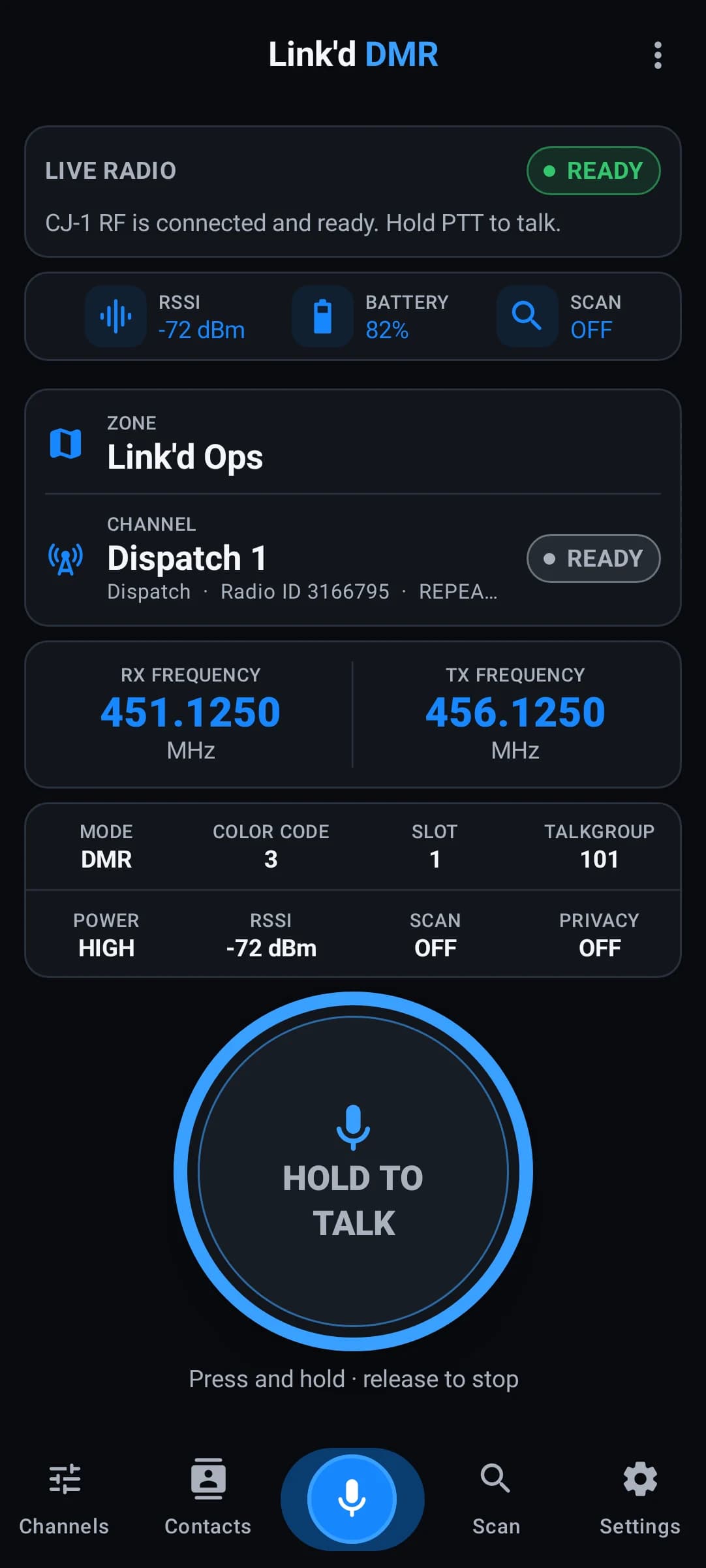
- Cellular now opens to a compact radio-first screen with group and current activity up front instead of a long control page.
- The Cellular PTT control stays anchored at the bottom of the screen, so it is ready without scrolling while group, people, and advanced details remain available.
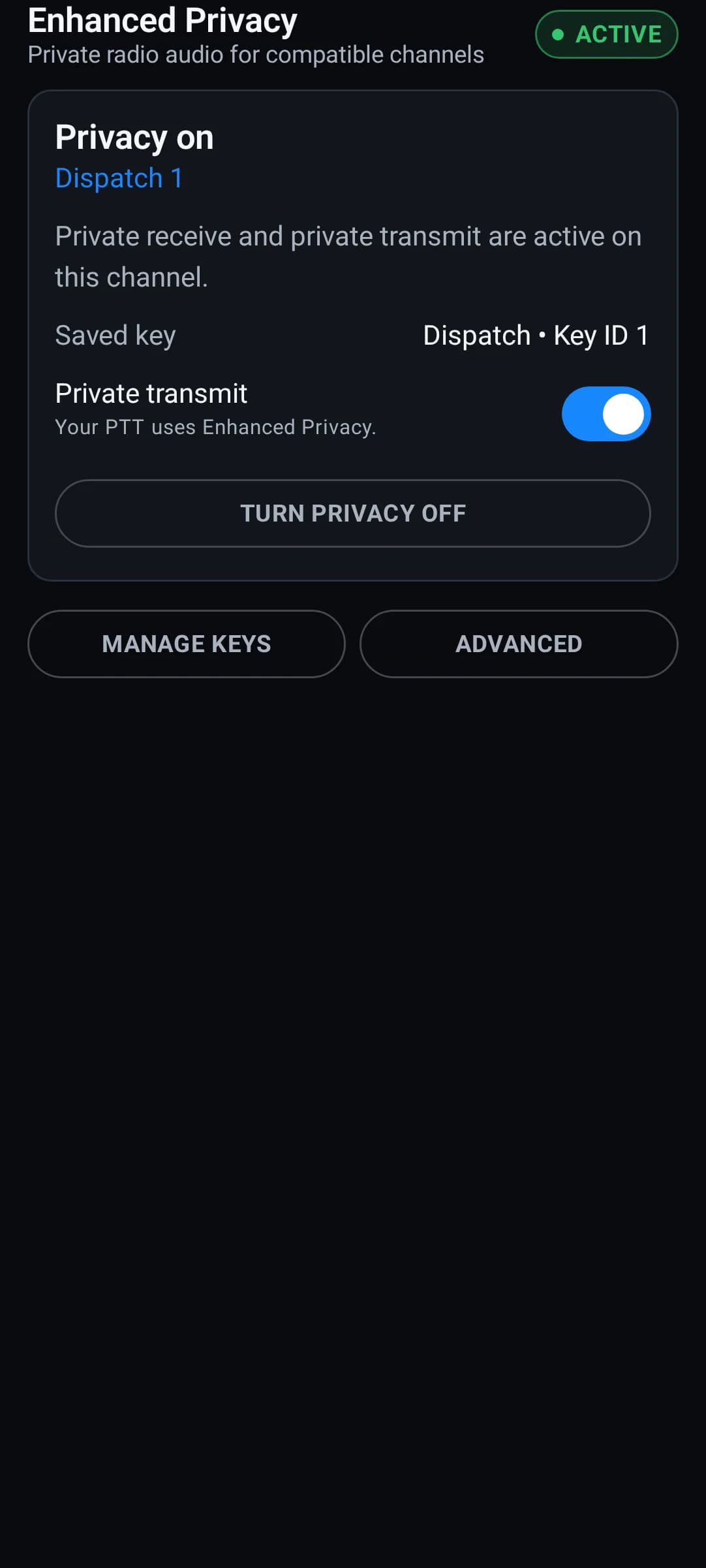
- Enhanced Privacy now uses clear operational ON, OFF, READY, and APPLYING language; the feature is no longer presented as beta when supported hardware is active.
- Saved privacy keys and technical interoperability details move into optional Manage Keys and Advanced sections without changing the guarded hardware behavior.
- Optional local radio sounds are off by default and can be enabled by the user, including the custom key sound after transmit; cues never become part of incoming transmission recordings.
- Public-beta signup and sign-in work on both linkddmr.com and the Android app without a signup token.
- Android 8.0+ testers can use account-authorized cellular PTT with private groups and server-enforced floor control.
- Signed-in testers can register devices, create private groups, and issue email-bound, single-use invitations to friends.
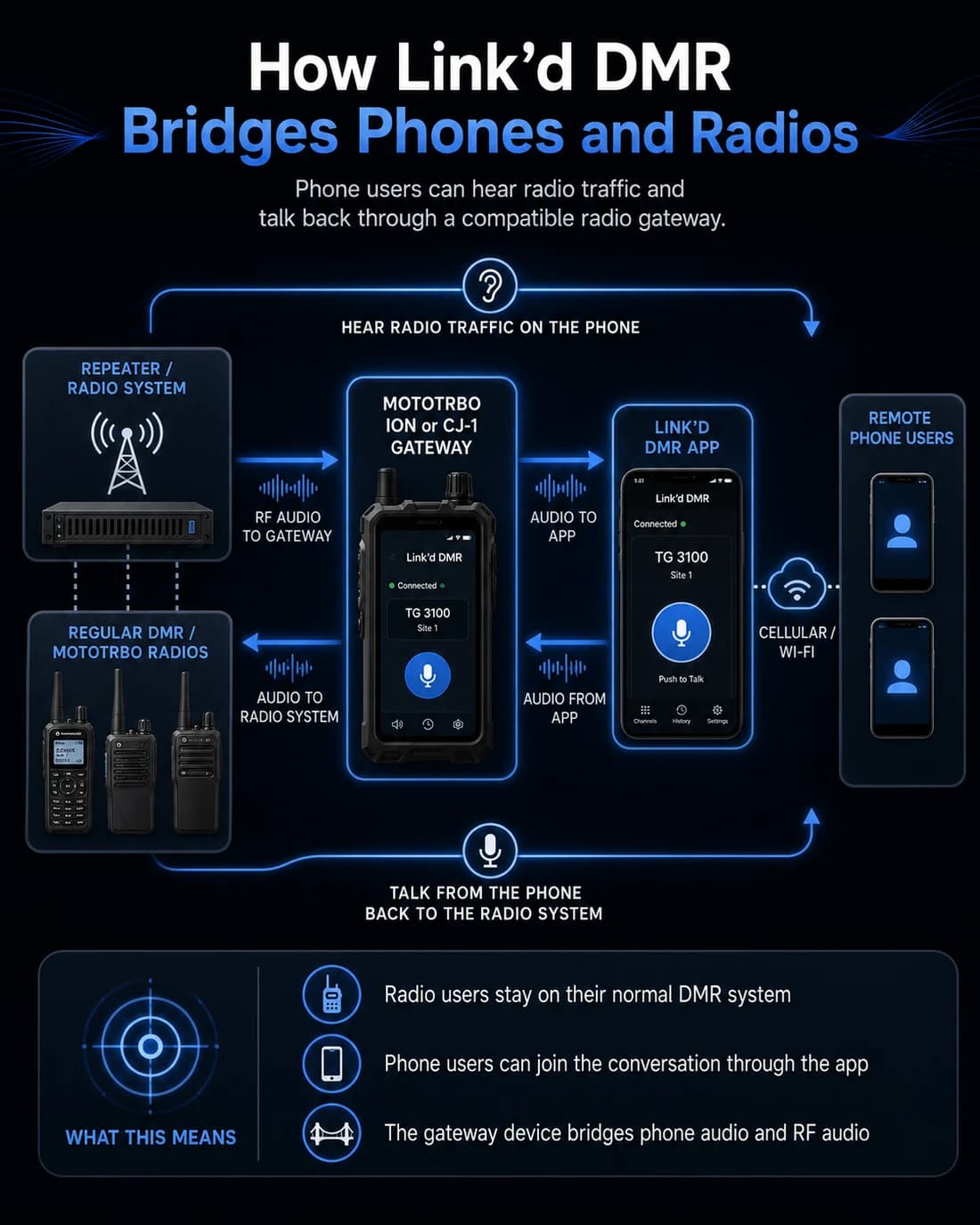
- Regular Android devices remain cellular-first; the compact radio home, local RF, and physical side-key features appear only on eligible exact-CJ hardware.
- The exact-CJ radio home adds a compact, performance-first channel view with live caller identity: a saved caller name when known and an always-visible numeric Radio ID.
- The exact-CJ destination display distinguishes GROUP / TG from PRIVATE / ID calls, including the saved group or contact name when available.
- CJ-1 and regular Android users now share a server-assigned numeric Linkd Radio ID, current-talker identity, device badge, transport, and group destination on the main PTT experience.
- The active-channel directory shows the complete bounded roster, online state, role, and Android or CJ-1 badge; the main screen keeps a compact four-radio preview for performance.
- Owners and authorized managers can send consent-based ring alerts and perform role-bounded remove, suspend, revoke-cellular, ban, and restore actions with confirmation, audit receipts, and safe retry recovery.
- Manager actions control LinkdDMR account and cellular access only; this release adds no covert listening, RF bricking, firmware kill, or remote microphone activation.
- Cellular PTT now uses direct LiveKit wiring, balanced touch and accessibility hold behavior, and truthful KEYING and TRANSMITTING states.
- Cellular PTT release, renewal, reconnect, and teardown work is bound to the exact session and floor cycle, preventing a late response from disconnecting a healthy or replacement session.
- Exact-CJ Night and Outdoor display modes, diagnostics, scan status, RF or Cellular provenance, and guarded RF-to-Cellular navigation are connected to real app behavior.
- Exact-CJ shortcuts open real Last Heard, Contacts or Save ID, Channels, Scan, Settings, and guarded Cellular destinations.
- The eligible exact-CJ local RF path remains usable while signed out, including saved per-channel Enhanced Privacy keys and quick channel switching.
- On an armed exact CJ-1, the physical side key can remain available while locked, screen-off, or outside the app.
- The beta keeps the same package and signing identity as the earlier CJ-1 field build, so existing testers can update in place.
Beta limits
- Code68 is the urgent recovery release for the withdrawn Code67 build. It deliberately restores the proven Code66 all-features application and database baseline; Scanner V2 and the home-screen widget will return only after they are correctly rebased and live-device tested.
- Enhanced Privacy never creates or labels a key as saved for a customer who did not save one. Existing user-created privacy keys remain local and are preserved during an in-place update.
- Code66 includes all seven CJ-1 feature tracks, but Automatic path selection remains unavailable unless a reviewed production handoff adapter is configured. Manual RF and Cellular selection stays fail-closed and cannot change paths while PTT is keyed.
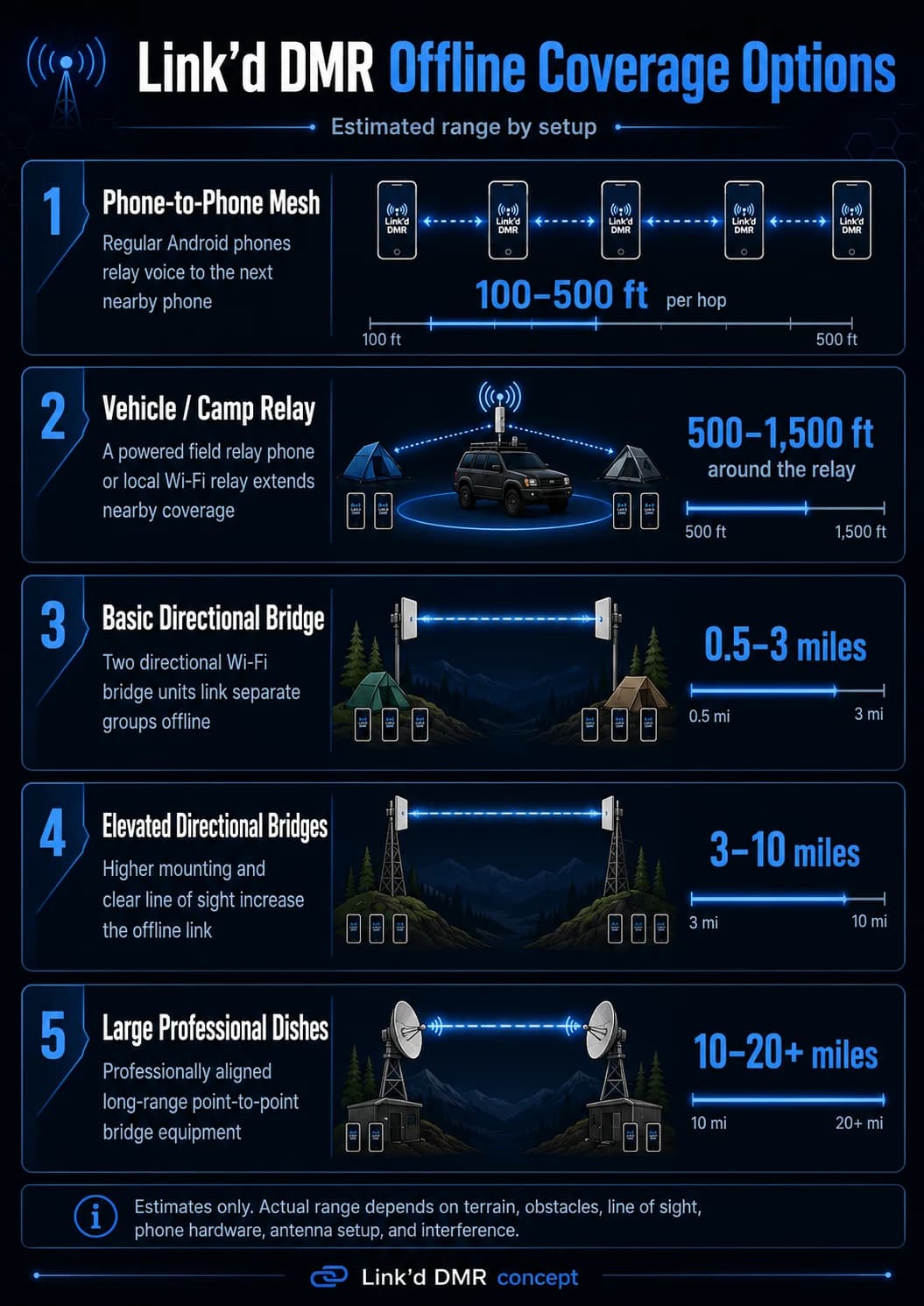
- Nearby coordination includes the bounded direct-device queue, authorization, expiry, receipt, and reconciliation surfaces, but Nearby remains unavailable unless a reviewed production transport adapter is configured. This release makes no multi-hop or verified range claim.
- Secondary physical-control actions depend on an explicitly supported and validated hardware profile. Unsupported mappings remain unavailable rather than guessing at key events.
- Link'd Business is an approved or invite-only public beta for Security teams and other multi-industry pilots. Workspaces use Site, Team, and Channel, with exactly one private Cellular Channel per Team, plus scoped roles, invitations, and the management-only Link'd Command dashboard.
- Link'd Command does not provide browser PTT, location tracking, work orders, safety automation, transcription, or AI features in this release.
- The CPS bridge programs the app-owned RF codeplug only. It is not direct RF-module or firmware readback, and entity deletion remains unavailable during live programming in this release candidate.
- Cellular PTT supports Android 8.0 and newer, but device-specific background restrictions can vary; screen-off physical side-key PTT is an exact-CJ feature, not a generic Android promise.
- Local RF and Enhanced Privacy remain limited to the exact Android 14 / API 34 CJ_1UV and supported DMR003N.UV4P.V### live firmware layouts after the website tool verifies selector 01.
- The self-hosted LiveKit selective-forwarding server transport-encrypts cellular audio but the cellular path is not end-to-end encrypted.
- The cellular beta has no TURN/TLS relay fallback, so restrictive Wi-Fi or mobile networks may fail.
- A cellular talkgroup room is limited to 64 concurrent participants during the beta.
- Current private-group membership, an active account session, and a registered Android device authorize cellular PTT; cloud membership does not authorize RF bridging.
- Enhanced Privacy is legacy Motorola-compatible ARC4-40 interoperability, not modern encryption.
- After a force-stop or reboot, reopen Link'd DMR; exact-CJ RF users must reconnect the radio and arm physical PTT again.
- This is field-test software, not a production or emergency-communications release.
Verify your download
- APK SHA-256
- ABF7C9AB3CBC9580F8D5BE35DEA5F228C57D504C8919C244937E440E750BEE58
- Signing certificate SHA-256
- 34A1B38342F03C62E9A07692FA8A7FCE0EDEE4111EB4CE9C7B746ED957AA0639
- Android package
- com.linkd.dmr.ownertest · version 0.2.65-cj1-public-beta · code 68